01304 827609 info@use-ip.co.uk Find us

DS-KD8003-IME1(B) firmware v3.7.1

Ekkoh

Member
Messages
20
Points
3
Hi,

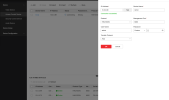
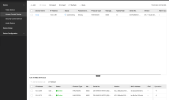
I just updated my doorbell to firmware 3.7.1. After this upgrade, I can no longer get the doorbell into my NVR, nor can I get recording. I add the device but the status only says "connecting". See attached picture. If I test the connection via the NVR, I get "Connection succeeded.".
I also can't add the doorbell as a camera, then it says mismatch. However, if I add it as Hikvision RTSP I can get the recording to my NVR, but I motion evens won't work.
Does anyone know what I can try to solve this? Thanks!
 

Attachments

  • Skärmavbild 2025-03-28 kl. 19.02.55.png
    Skärmavbild 2025-03-28 kl. 19.02.55.png
    98.7 KB · Views: 197
  • Skärmavbild 2025-03-28 kl. 19.03.05.png
    Skärmavbild 2025-03-28 kl. 19.03.05.png
    98.1 KB · Views: 175
I think you’ll be waiting for either another firmware update for the doorbell or your NVR to fix it. This was a long ongoing issue on the M series NVRs that was finally fixed in a recent update. However it was broken again when I updated my 6113 intercom yesterday to 3.7.0 and will now only add as a video device using RTSP. You’ll see that both myself and @stuhope123 have reported similar yesterday. Hoping @Kyle may be able to feed back to Hikvision support and get further information….
 
yes, i saw that more people were having problems. i actually got my doorbell online yesterday. no idea how i did it or how they worked. had to remove it though and now it just says offline. if i check the log in the doorbell, it keeps logging in and out.
 
Could someone share the firmware with me as i want to test something out with the new firmware of my nvr m series
 
Yesterday I installed the latest Firmware_V3.7.1_250819 for DS-KD8003-IME1(B), and now it does not show in iVMS-4200 and in SADP. I have contacted Hikvision via email and hope they reply.
Tried all possible steps, it seems the latest firmware has bricked it.

Has anyone tried to downgrade the firmware, and if yes, what are the steps to downgrade it?
 
You need serial cable, you stop in boot time

Setenv ipaddr 192.0.0.64
Setenv serverip 192.0.0.128
Update
 
Yesterday I installed the latest Firmware_V3.7.1_250819 for DS-KD8003-IME1(B), and now it does not show in iVMS-4200 and in SADP. I have contacted Hikvision via email and hope they reply.
Tried all possible steps, it seems the latest firmware has bricked it.

Has anyone tried to downgrade the firmware, and if yes, what are the steps to downgrade it?
The installer will send the unit to the Hikvision office for them to inspect.
 
He said he has no idea why it is not working and wanted Hikvision to figure it out.
 
Back
Top