Hi,
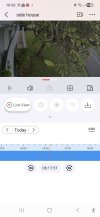
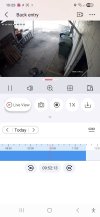
I’m trying to understand the Hik‑Connect playback timeline a bit better. On HiLook systems I can see motion events clearly, the timeline shows red markers while still recording continuously. However, I can’t seem to get the same behaviour on a Hikvision NVR.
The NVR is set to continuous recording, and the camera has Motion Detection and Dynamic Analysis for Motion enabled, but I still don’t see any red motion events in playback. The model is a DS‑7604NI‑I1/4P.
I have a few clients who want continuous recording with motion events highlighted, so I’m trying to work out if there’s a setting I’m missing or if this model simply doesn’t support that type of event tagging.
Is there a known solution or workaround for this?
I’m trying to understand the Hik‑Connect playback timeline a bit better. On HiLook systems I can see motion events clearly, the timeline shows red markers while still recording continuously. However, I can’t seem to get the same behaviour on a Hikvision NVR.
The NVR is set to continuous recording, and the camera has Motion Detection and Dynamic Analysis for Motion enabled, but I still don’t see any red motion events in playback. The model is a DS‑7604NI‑I1/4P.
I have a few clients who want continuous recording with motion events highlighted, so I’m trying to work out if there’s a setting I’m missing or if this model simply doesn’t support that type of event tagging.
Is there a known solution or workaround for this?